

Students can now access their schedules online.
IF YOU HAVE TROUBLE ACCESSING YOUR SCHEDULE, WE WILL HAVE PAPER COPIES AVAILABLE AT ORIENTATION (8/12/26), AT SCHEDULE WALK-THROUGH (8/13 AND 8/14), AND THE FIRST DAYS OF SCHOOL.
This will be the only time they will be using ProgressBook. Canvas will be used for the rest of the year for course content, online lessons, class grades, etc.
Students can follow these steps to access schedules:
1. Click here to access the login page.
2. Do not click the green login button.
3. Click the "Students Sign in with Google" button.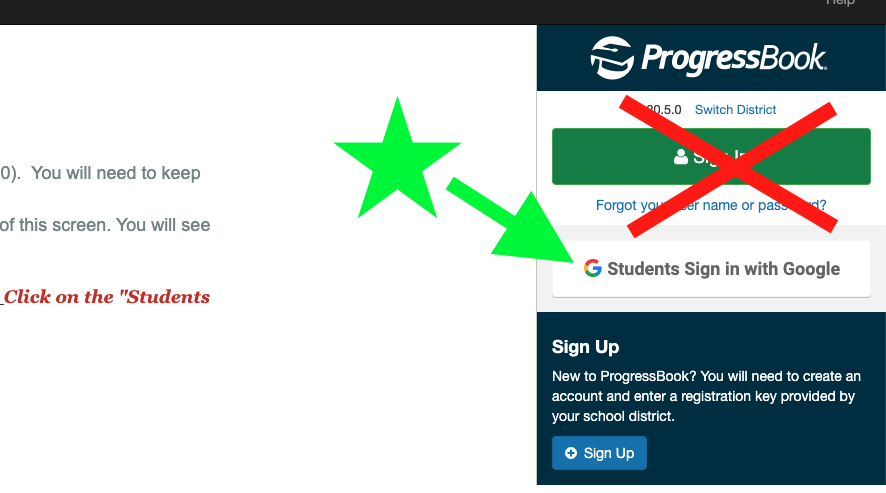
4. Students should use their school Gmail email address and school password to log in. If they do not know these items, please contact the school office (martinam@japioneers.org or 614-873-4635).
5. Click on "Schedule" on the left menu bar to view the schedule.
Schedule Reminders and FAQs:
Students will begin each day in their Advisory. This is their homeroom.
All students are enrolled in a Study Lab course. We will discuss this at orientations.
All
students
in a grade level eat lunch together.
Locker numbers can be found on students' schedules.
Students will receive an additional printed copy of
schedules
during Advisory on the first day of school. They will be available at orientations (8/12) as well.
There are many factors that go into
schedules
and exploratory classes, including
class
sizes, period availability, and course criteria.
Students
are asked to start the year with the provided
schedule
but can talk with the school counselor about
schedule
change questions.